Critical Review of a Digital Humanities Platform or Tool: Zotero
Murtaza Ahmed
Department of Digital Humanities, University College Cork
DH1002: Digital Tools and Methods I
Mr. Shawn Day
February 15, 2024
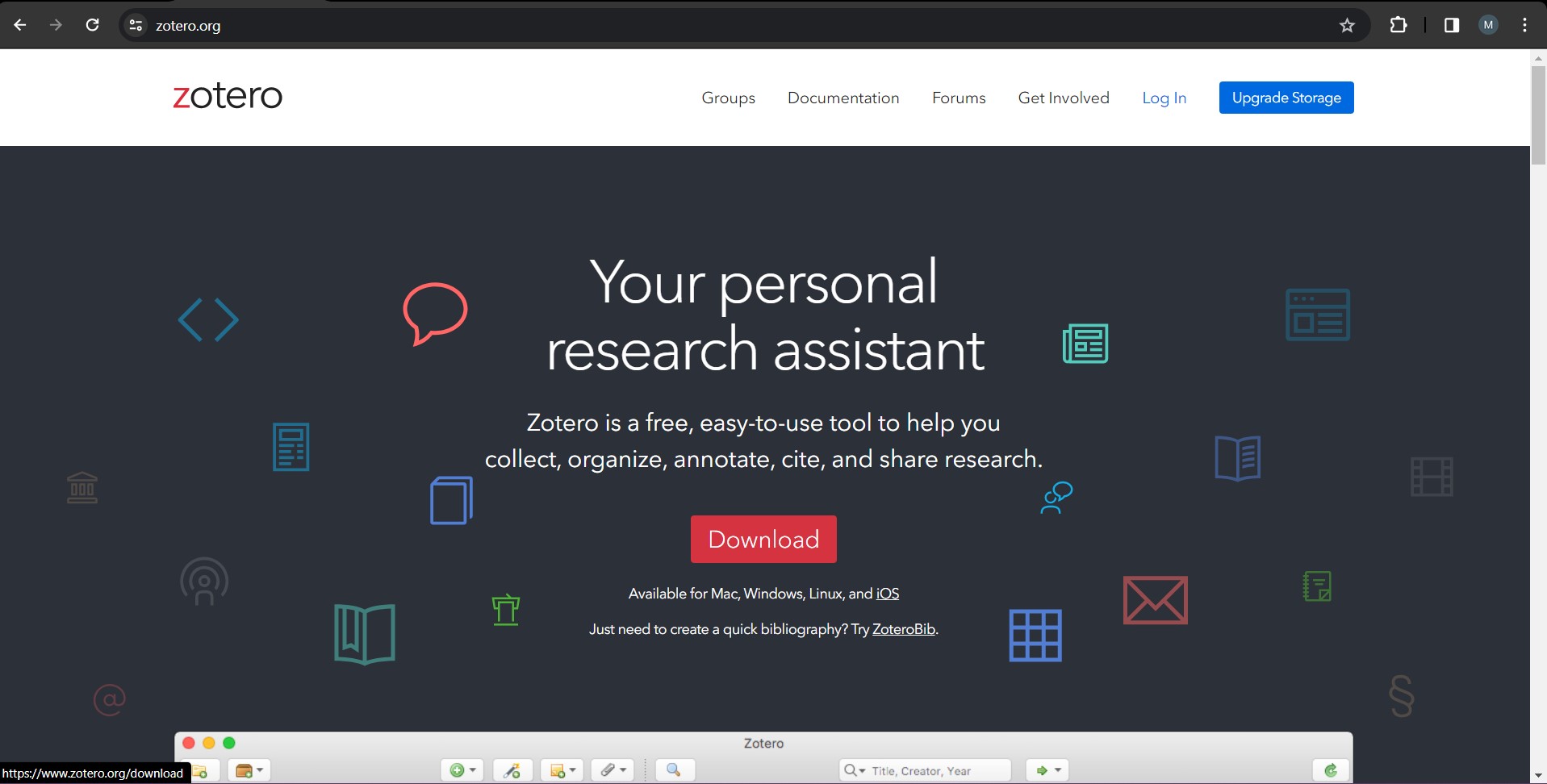
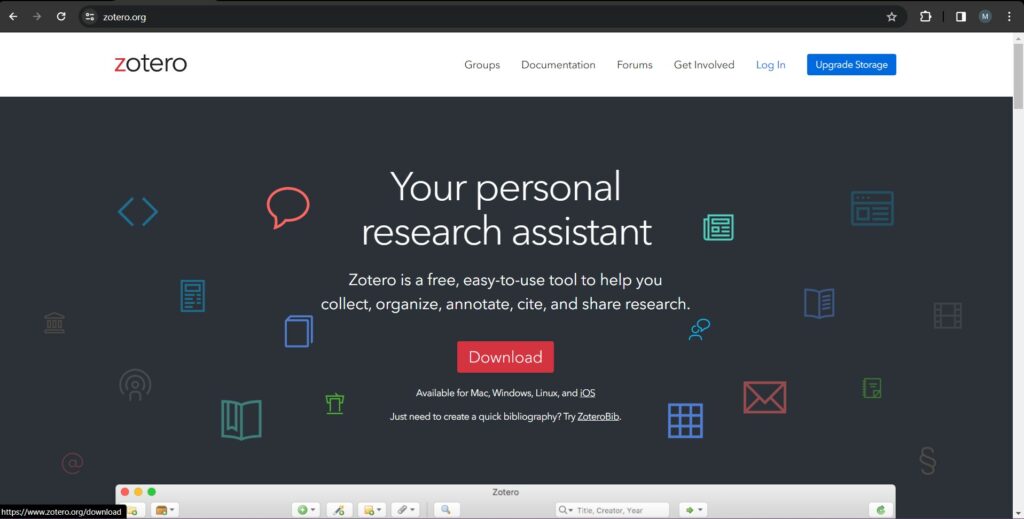
Zotero is a citation generation and research tool advertised as being “free, [and] easy-to-use”. It “help[s] you collect, organise, annotate, cite, and share research”, as stated by its homepage. In order to provide an adequately thorough analysis of the viability of the citation tool within the context of the field of Digital Humanities, this review will contain a variety of qualitative assessments on the tool. These assessments include: prefacing the research done on the tool, juxtaposing the product provided by Zotero with the supplementary tools “Endnote” and “Mendeley”, analysing the development of the tool and its history, and surveying my own personal usage of the product.
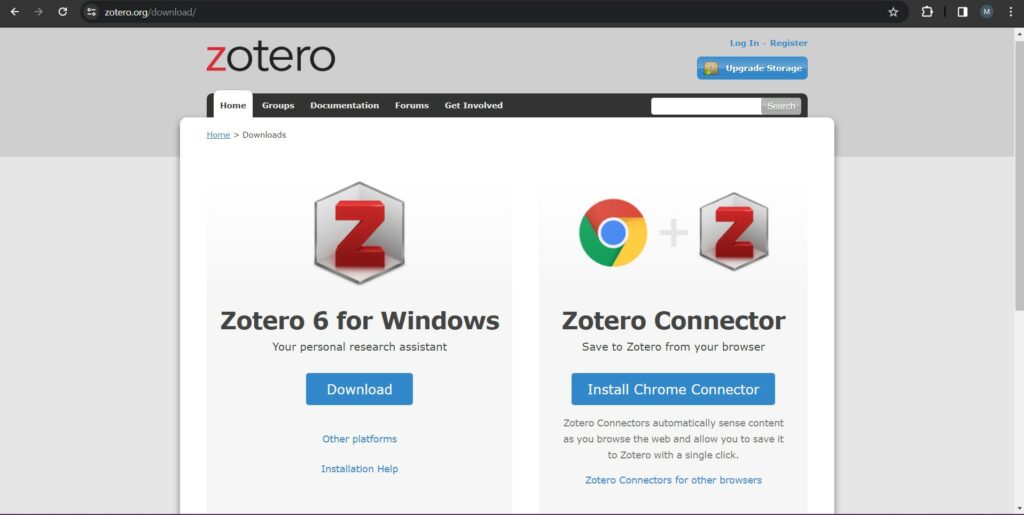
To commence my research for this tool for this review, I began by accessing the official website for the application: https://www.zotero.org/. This website is easily accessible and does an adept job to outline the key features and unique aspects of zotero. It was easy to download the Windows app and also to connect the application to my browser to be able to extract citations on the web.
The research articles I read when researching Zotero were refined and articulate, providing a lot of positive feedback and valid criticisms. From analysing the various articles and the website itself, one could argue that Zotero theoretically alone is a proficient tool for the field of Digital Humanities.
As scholars of Digital Humanities (henceforth given the moniker DH), we are constantly looking at research and sources for information, in any given context. A tool such as Zotero collects and organises these sources and citations in a comprehensive manner. This is especially true considering that Zotero is an expert at managing sources that are online, a realm that students of DH specialise in.
Zotero also integrates various sources aside from research papers, for example: text, audio, video, and various other forms of multimedia. These features, alongside being an open-platform application, make it a fantastic tool for Digital Humanities.
Around the world in 2024, over 683 companies have started using Zotero as a “Copywriting And Content Writing Services” tool.
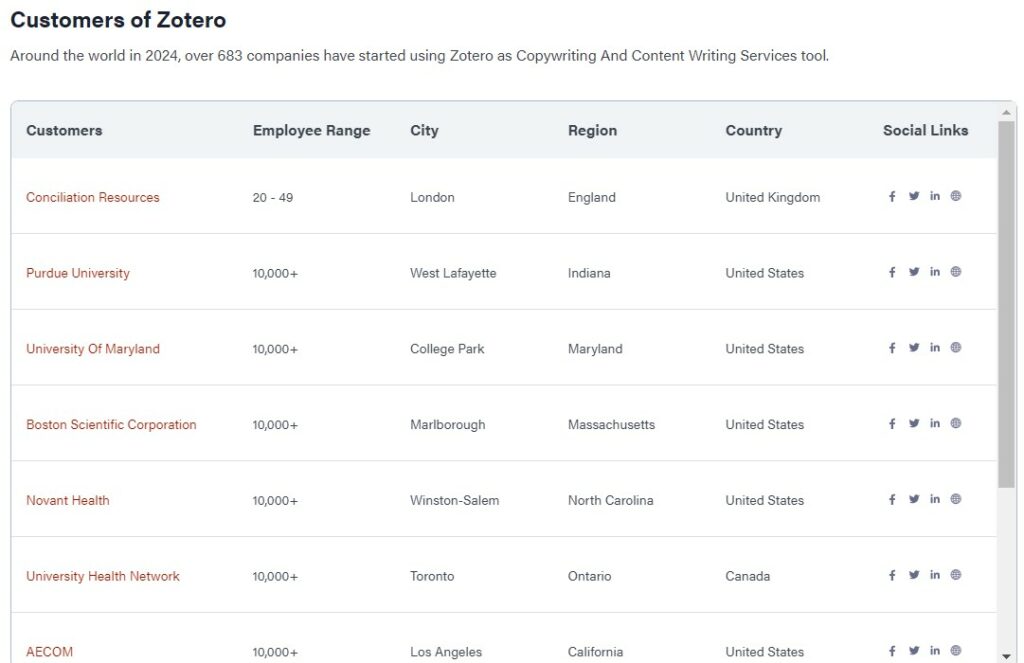
From personal experience, the app has been incredibly useful for my coursework. I’m using the app for this assignment itself. I have a list of all the sources for this project compiled and cited in the requested format. The annotations and highlighting features have been indispensable for the success of my previous works.
Zotero is a very well documented page. The documentation is in the form of a Zotero wiki page, which is divided into three distinct sections. The first section is “general user documentation”. This serves as the manual of Zotero and teaches users with the fundamental installation and application of the tool.
The “developer section” focuses on the technical elements of Zotero: this consists of interacting with the “Zotero client, translators, localization, documentation, CSL styles, the Zotero API, etc.” Finally, the “knowledge base” is an amalgamation of the queries and discussions in the Zotero public forums. I personally used the knowledge base for research on this assignment and it proved to be quite beneficial. The forums themselves are user-regulated and managed by volunteers.
Zotero is free to download, with options to purchase additional online storage.
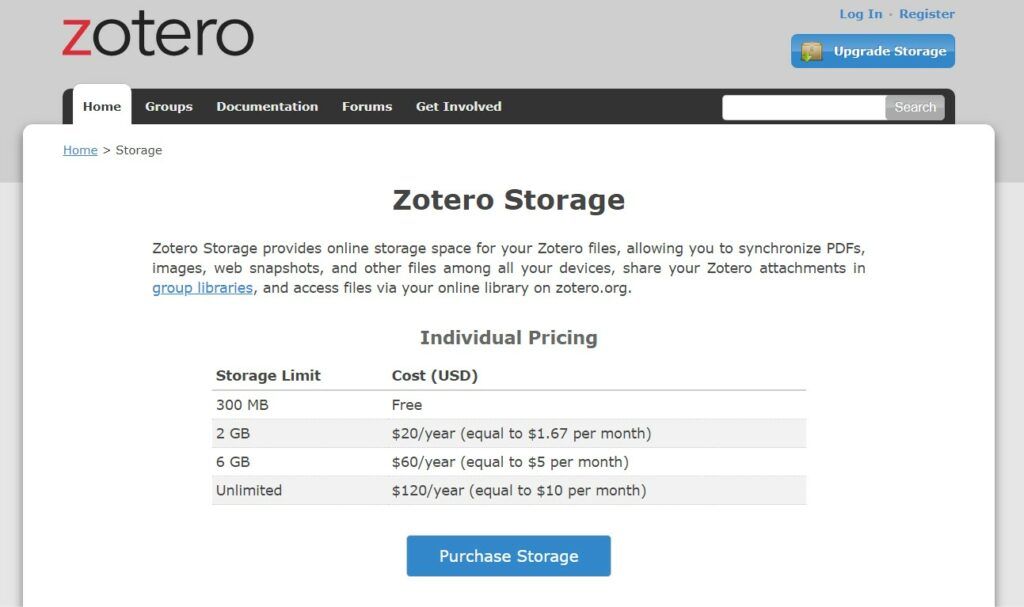
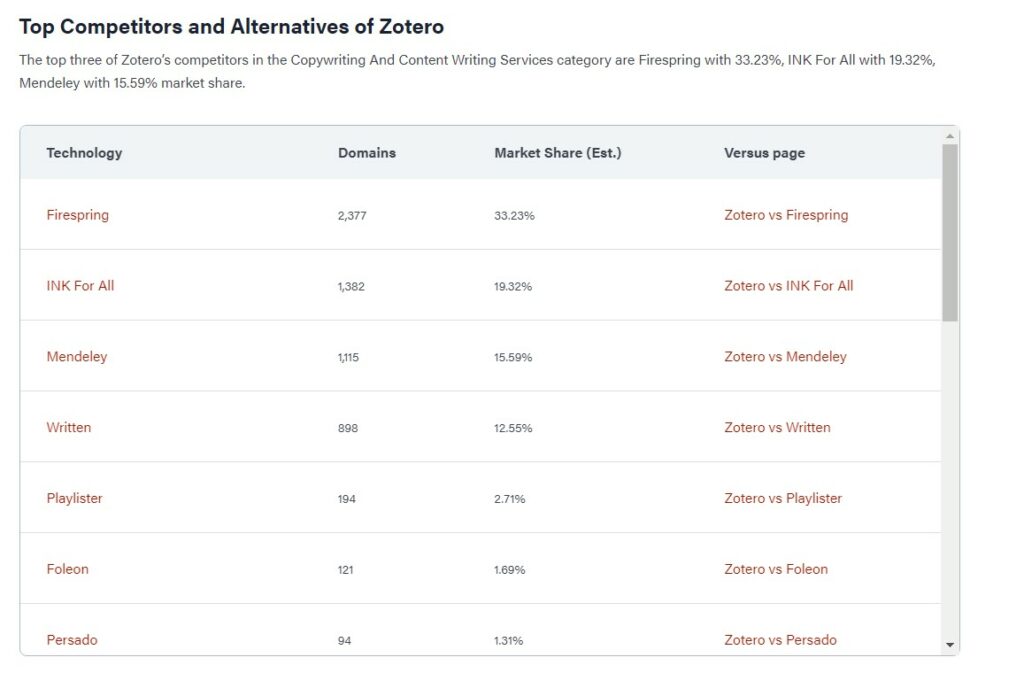
Zotero has a multitude of alternatives but the two I will compare it to are EndNote and Mendeley.
First, I will compare Zotero to Endnote. The following data is taken from an analysis done by Paperpile.
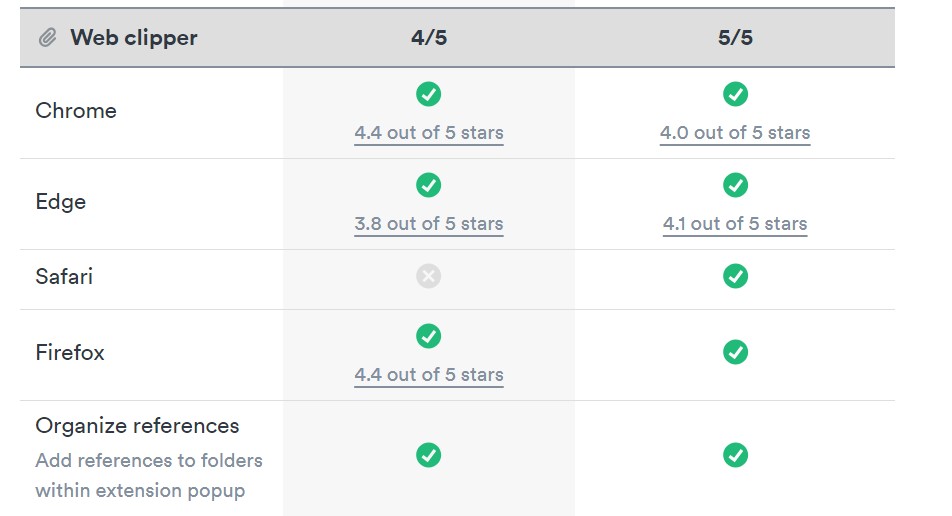
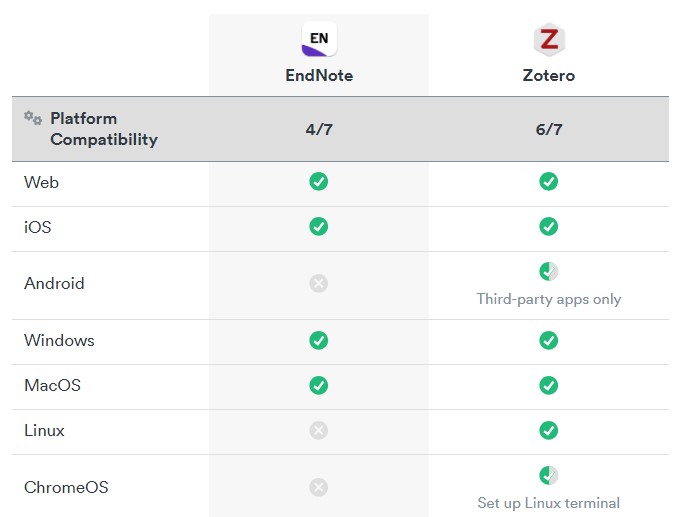
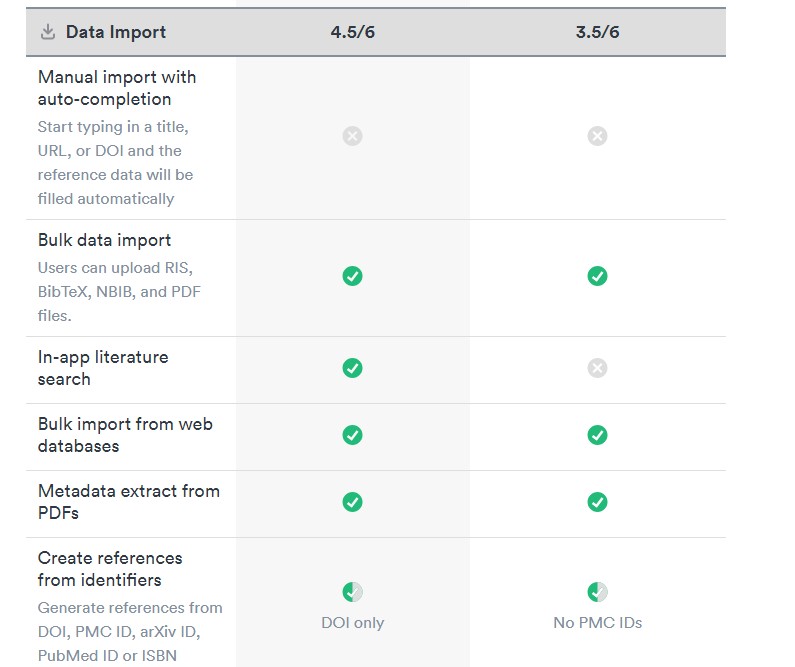
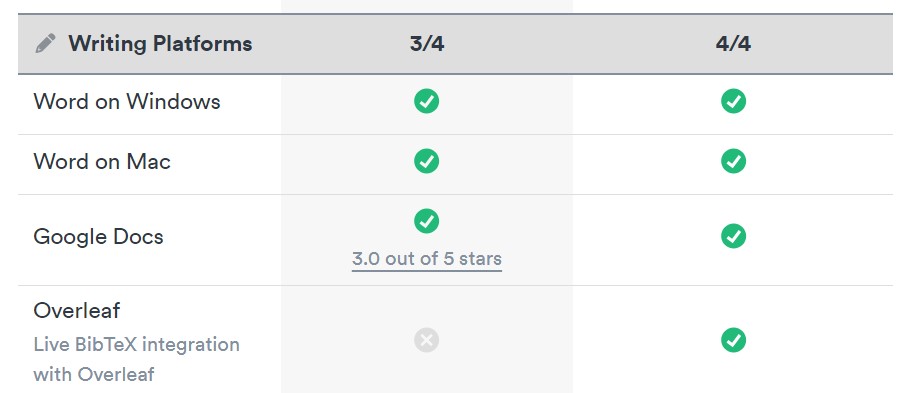
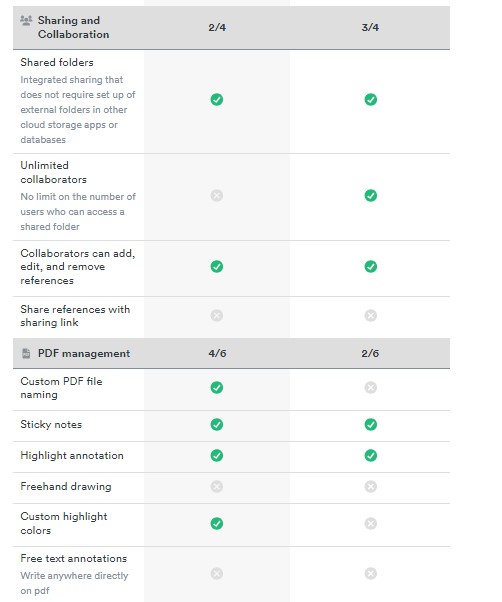
The important factors to consider when choosing between Zotero and Endnote are cost and support. Endnote has a base price to use the application, whereas Zotero is free. Zotero is very much user-support based and only uses forums as a means of communication. Meanwhile, Endnote has a dedicated support team for its users.
The key difference between Zotero and Mendeley is storage space, with Zotero having 200MB. and Mendeley having 2GB. Below is a comprehensive comparison of the three softwares:
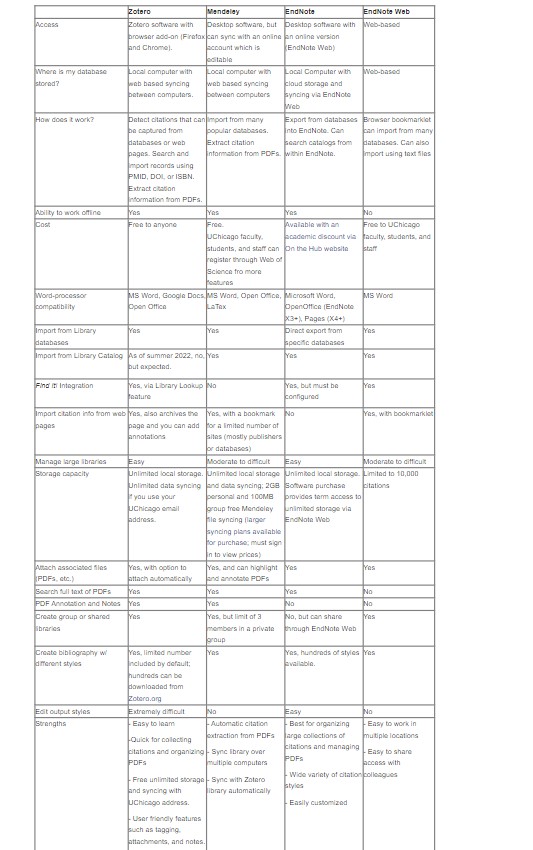
From personal user experience, I favoured Zotero over the other two applications. Perhaps due to having more time with the app, but I found it much easier and comfortable to navigate through the app and extract citations from works. I acknowledge that the other two tools have their advantages also, but my preference remains with Zotero.
There is no official public roadmap for Zotero, to the chagrin of many of its users. The closest equivalent would be accessing old builds or finding screenshots of older versions of the app.
The tool itself is quite stable, I have not personally encountered any bugs when utilising it. The Zotero forums are quite active and I can see many issues that are quick to be solved.
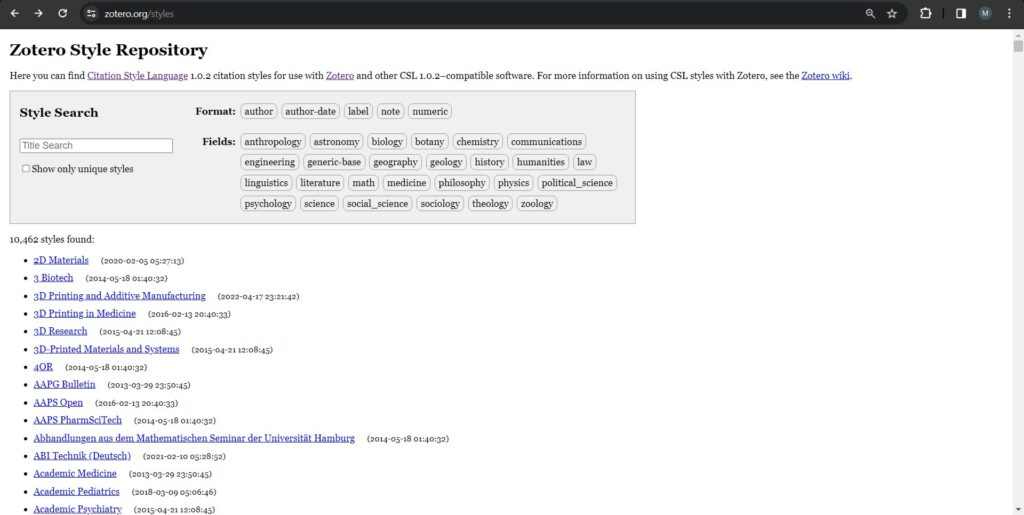
Zotero has quite an extensive database of standards and formats. There are over 10,00 formatting styles for both citations and bibliographies. This vast collection allows Zotero to integrate with any style of writing and citing.
Zotero uses an extensive database based in SQLite that with some proficiency and support from the documentation, can be accessed and managed to a comprehensive degree. You can backup your data, locate missing data, and more, all of which can be read in the data directory wiki page.
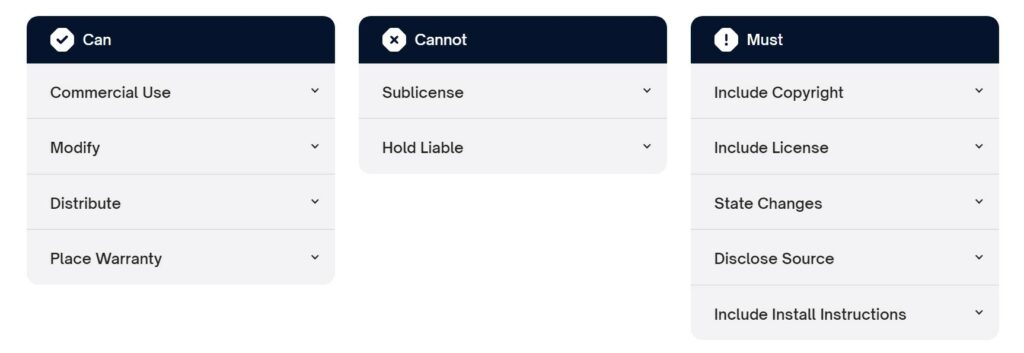
Zotero as a tool uses (unless stated otherwise) a “GNU Affero General Public License v3 (AGPL-3.0)”. The following image is a short summary of the prerequisites of using this licence:
According to the licensing wiki page, any Zotero wiki content created after the date April 26th, 2015, is “released under a Creative Commons Attribution-ShareAlike 4.0 International License (CC-BY-SA 4.0).”
Any wiki content published previously may be “licensed under a Creative Commons Attribution-NonCommercial-ShareAlike 3.0 Unported License (CC BY-NC-SA 3.0).”
The first version of Zotero, “1.0.0b2.r1”, was a plug-in made for Firefox, available to the public in October of 2006. Since then, the product has grown exponentially and has created for itself a strong, loyal community supporting and using the open-source application substantially.
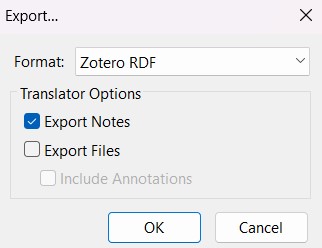
Zotero has quite a simple process for exporting data, which can be located in the wiki. The process is fast and there are a significant amount of exporting formats available.
From my research of Zotero, I have amassed a considerable quantity of information on the tool, including its uses and its intricacies. I have no doubt that my research is founded on veracious principles and a remarkable population of Zotero users would agree with my statements in this review.
I enjoy using this product to a great extent. I have used it to read many articles, schoolwork or otherwise. I have read texts from many DH modules, including the reading from this module, “Annabel Scheme”. I particularly appreciate the highlighting feature, and use it abundantly. The organisation of files and annotations is effective. The forums are incredibly useful in learning about the app more in both theory and application. The built-in citation generator is superb. I use it for every project and it is impressively flexible in terms of the different styles of citations. Using Zotero for this assignment has been an extremely positive and beneficial experience. The following images are examples of me using Zotero in previous projects.
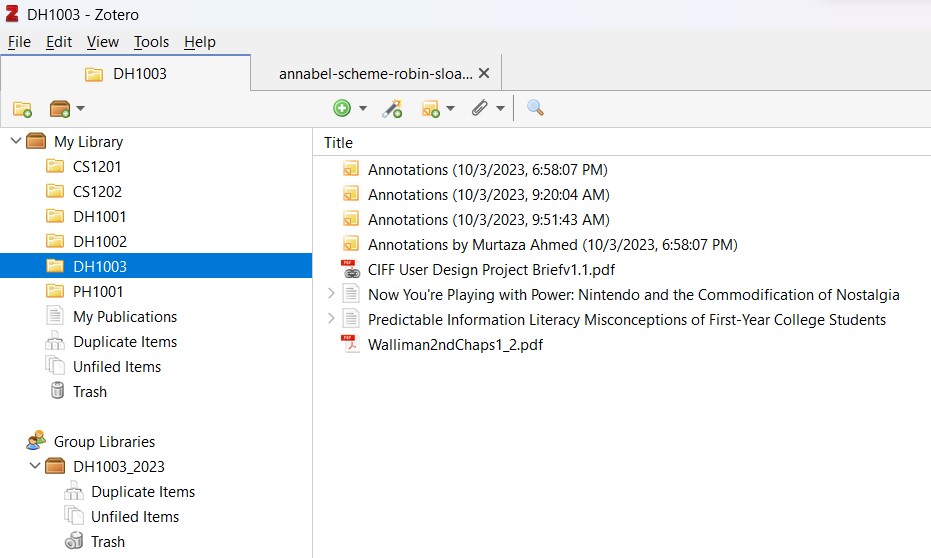
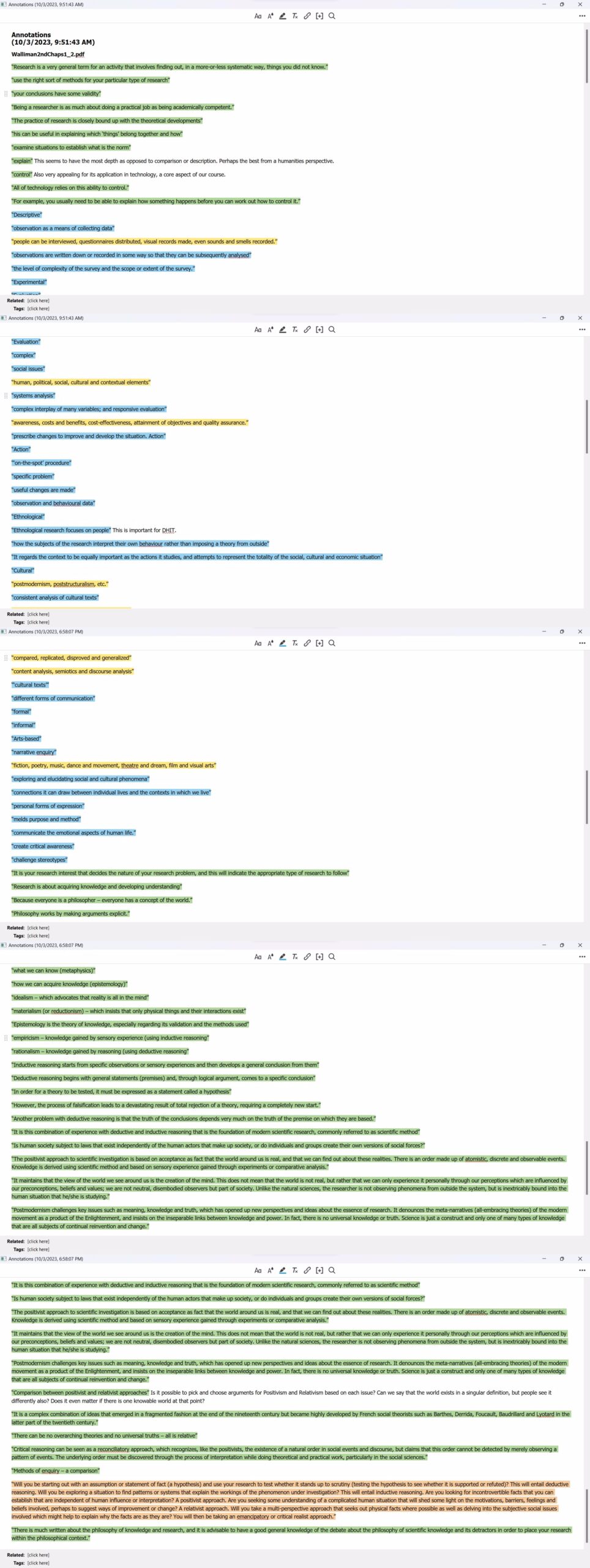
The only criticisms I would have for Zotero would be a lack of visual aesthetics customization, especially some kind of dark mode (without needing a third party plugin), and a lack of incentive for development of a mobile app. Also, the annotation and highlighting process, while enjoyable and useful, can be quite clumsy at times, especially when it comes to modifying the highlights or annotations, which is borderline impossible. It is easier to just delete the aforementioned additions and create a new one, which shouldn’t be the case.
In conclusion, Zotero is a fantastic digital tool to use in the field of Digital Humanities. More than that, it is a superb application for broader academia as a whole. I would recommend this product to all students, especially Digital Humanities students. It is easy to learn, beneficial to master, effective for organisation, and unparalleled for citations. Researching the application has been fascinating, and I hope to be able to apply what I learned from this assignment and become a more adept scholar of the Digital Humanities.
Works Cited
‘Zotero | Your Personal Research Assistant’. n.d. Accessed 15 February 2024. https://www.zotero.org/.
Vanhecke, Thomas E. 2008. ‘Zotero’. Journal of the Medical Library Association : JMLA 96 (3): 275–76. https://doi.org/10.3163/1536-5050.96.3.022.
Idri, Nadia. 2015. ‘Zotero Software: A Means of Bibliographic Research and Data Organisation; Teaching Bibliographic Research’. SSRN Electronic Journal. https://doi.org/10.2139/ssrn.2843984.
Ahmed, K K Mueen, and Bandar E Al Dhubaib. 2011. ‘Zotero: A Bibliographic Assistant to Researcher’. Journal of Pharmacology and Pharmacotherapeutics 2 (4).
‘Zotero – Market Share, Competitor Insights in Copywriting And Content Writing Services’. n.d. 6sense. Accessed 15 February 2024. https://www.6sense.com/tech/copywriting-and-content-writing-services/zotero-market-share.
‘EndNote vs Zotero: Which Reference Manager to Choose [2023] – Paperpile Reference Manager’. n.d. Paperpile. Accessed 15 February 2024. https://paperpile.com/r/endnote-vs-zotero/.
‘Zotero – Market Share, Competitor Insights in Copywriting And Content Writing Services’. n.d. 6sense. Accessed 15 February 2024. https://www.6sense.com/tech/copywriting-and-content-writing-services/zotero-market-share.
‘Mendeley – Reference Management Software’. n.d. Accessed 15 February 2024. https://www.mendeley.com/.
‘Zotero vs Mendeley Comparison – York University Libraries’. n.d. Accessed 15 February 2024. https://www.library.yorku.ca/web/research-learn/citing-your-work-academic-integrity/citations/zotero-vs-mendeley-comparison/.
‘Which Tool Is Best For Me? – Citation Management – Library Guides at UChicago’. n.d. Accessed 15 February 2024. https://guides.lib.uchicago.edu/c.php?g=297307&p=1984557.
‘Zotero Style Repository’. n.d. Accessed 15 February 2024. https://www.zotero.org/styles.
‘Dev:Documentation [Zotero Documentation]’. n.d. Accessed 15 February 2024. https://www.zotero.org/support/dev/documentation.
‘Zotero_data [Zotero Documentation]’. n.d. Accessed 15 February 2024. https://www.zotero.org/support/zotero_data.
‘Licensing [Zotero Documentation]’. n.d. Accessed 15 February 2024. https://www.zotero.org/support/licensing.
‘Zotero’. 2024. In Wikipedia. https://en.wikipedia.org/w/index.php?title=Zotero&oldid=1206415399.
‘Kb:Exporting [Zotero Documentation]’. n.d. Accessed 15 February 2024. https://www.zotero.org/support/kb/exporting.